
#案例-登录界面
- 更新时间:2026-06-15 07:53:04
这是一个简单的登录界面案例
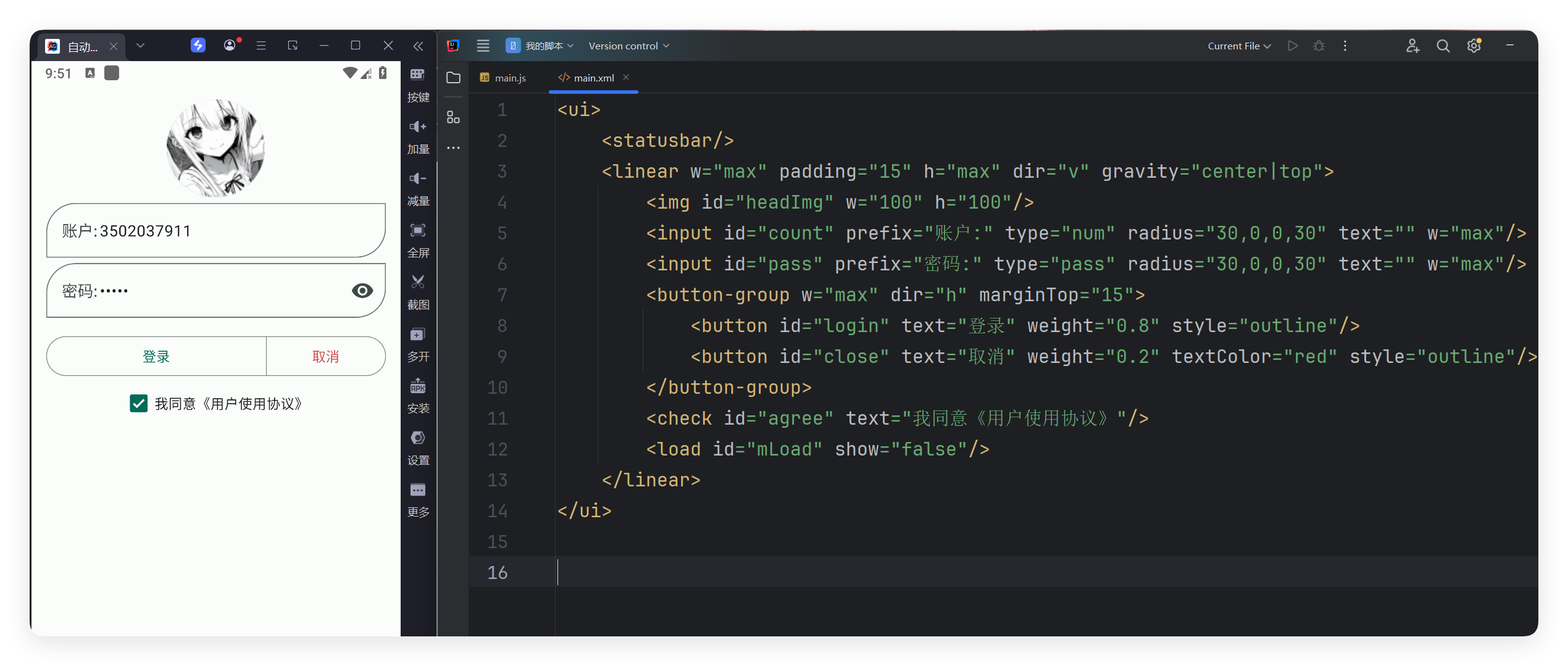
#Xml代码
<ui>
    <statusbar/>
    <linear w="max" padding="15" h="max" dir="v" gravity="center|top">
        <img id="headImg" w="100" h="100"/>
        <input id="count" prefix="账户:" type="num" radius="30,0,0,30" text="" w="max"/>
        <input id="pass" prefix="密码:" type="pass" radius="30,0,0,30" text="" w="max"/>
        <button-group w="max" dir="h" marginTop="15">
            <button id="login" text="登录" weight="0.8" style="outline"/>
            <button id="close" text="取消" weight="0.2" textColor="red" style="outline"/>
        </button-group>
        <check id="agree" text="我同意《用户使用协议》"/>
        <load id="mLoad" show="false"/>
    </linear>
</ui>#JS代码
let storage = $storage.create("我的登录案例");
let ui = $ui.layout("main.xml");
//开始写代码
let headImg = ui.id("headImg");//头像
let count = ui.id("count");//账户
let pass = ui.id("pass");//密码
let login = ui.id("login");
let close = ui.id("close");
let mLoad = ui.id("mLoad");
let agree = ui.id("agree");
let getQqHeadUrl = function (qq) {
    return "https://q.qlogo.cn/headimg_dl?dst_uin=" + qq + "&spec=100";
}
count.onFocusChange((hasFocus) => {
    if (!hasFocus) {
        //设置QQ头像
        let url = getQqHeadUrl(count.getText());
        headImg.setUrl(url);
    }
});
agree.onCheck((isChecked, view) => {
    storage.putBool("agree", isChecked);
});
//取消登录
close.click(() => {
    ui.finish();
});
//开始登录
login.click(() => {
    if (!agree.isChecked()) {
        agree.snack("请同意协议");
        return;
    }
    mLoad.show();//先显示加载中
    sleep(2000);//正在执行
    //执行登录操作
    let qq = count.getText();//账户
    let ps = pass.getText();//密码
    if (qq !== "") {
        storage.putStr("qq", qq);
    }
    if (ps !== "") {
        storage.putStr("ps", ps);
    }
    //....
    sleep(2000);//正在执行。。。
    mLoad.hide();//关闭
    mLoad.snack("登录成功");
});
//在应用显示的时候,就读取存储的qq密码
if (storage.getStr("qq") !== "") {
    count.setText(storage.getStr("qq"));
    //加载qq头像
    headImg.setUrl(getQqHeadUrl(storage.getStr("qq")));
}
if (storage.getStr("ps") !== "") {
    pass.setText(storage.getStr("ps"));
}
ui.show();//显示界面